
|
MyGaDOE |
Version 1.0 |
The Delete Job Openings page is used to remove an Employment Opportunity item from the list of items available.
To delete job openings, complete the following steps:
From any page in MyGaDOE, place your mouse above the Jobs option in the Navigation menu. The Jobs flyout menu displays, as shown below.
The Jobs flyout menu, showing both the View Jobs option which everyone can see and the Add Jobs option, which is only accessible by content managers
Click the View Jobs option. The Employment Opportunity page displays, as shown below. The lists which a user can view are based on access rights for that user.

The Employment Opportunities page lists jobs available with the Georgia Department of Education and local school districts in the state
Locate the item you want to delete from the lists of items to which you have access.
Click the
Delete ( ) icon to the right of that job posting. The
Delete confirmation box displays, as shown below.
) icon to the right of that job posting. The
Delete confirmation box displays, as shown below.
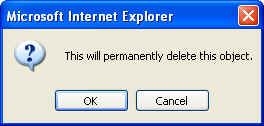
The Delete confirmation box
Click the OK button to approve the deletion or the Cancel button to cancel the deletion.
If you click OK, the job posting is deleted and the user is returned to the Employment Opportunities page.
This completes the Delete Job Posting process