|
MyGaDOE |
Version 1.0 |
To log out of MyGaDOE, complete the following steps:
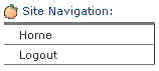
Locate the Site Navigation menu at the top of the Navigation menu, near the top left of any page in MyGaDOE.
The Site Navigation section of the Navigation menu, showing the Logout option
Note: The Navigation menu displays no matter what page you are in, unless you hide it using the Hide Menu link. If this is the case, click the Show Navigation link, located near the top left of the page, as shown in the graphic below. The Navigation menu displays. Please proceed with the next step.
The Show Navigation link lets you restore the Navigation menu, if it is minimized
Locate the Logout option.
Click the Logout option. MyGaDOE logs you out and displays the Login page.