|
MyGaDOE |
Version 1.0 |
Security has become an increased concern for everyone in recent years. Since the Georgia Department of Education, as well as regional and local education entities, handle considerable amounts of personal and private information, it is vital that we do everything within reason to protect that information for those people who have instructed it to us.
For that reason, we are requiring a change of password every 60 days.
While we understand that this will inconvenience you, our users, we ask you to understand the critical importance of this policy and to do everything you can to help us protect our students and education professionals.
To do this, every 60 days you will be prompted to change your password (this is called “Reset Password” in the language of MyGaDOE). To change your password, complete the following steps:
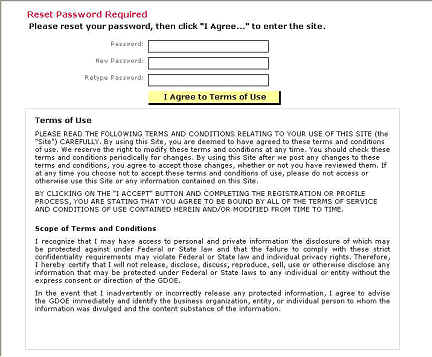
When it’s time to change your password, the Reset Password Page displays, as shown below.
The Reset Password page displays when it is time to change your password or when the password needs to be reset
Enter your current password in the Password field.
Enter your new password in the New Password field.
Note: The new password must not be one you have used before. MyGaDOE keeps track of your previously used passwords and will not permit you to use them again. This is another security measure, and is part of our attempt to keep the confidential information of Georgia citizens safe. If you do enter an old password, you will be prompted to change it when you click the I Agree to Terms of Use button.
Re-enter your new password in the Retype Password field.
Read the Terms of Use agreement at the bottom of the page.
Click the I Agree to Terms of Use button.
Your password has been changed. This completes the change password process.