From the
Compose Message page, click the Address Book button ( ).
The address
book window displays, as shown below.
).
The address
book window displays, as shown below.
|
MyGaDOE |
Version 1.0 |
Using the Address Book in MyGaDOE messaging is a lot like using the address book in a standard e-mail application. This document shows you how to use it.
To see the Address Book page, complete the following steps:
From the
Compose Message page, click the Address Book button ().
The address
book window displays, as shown below.
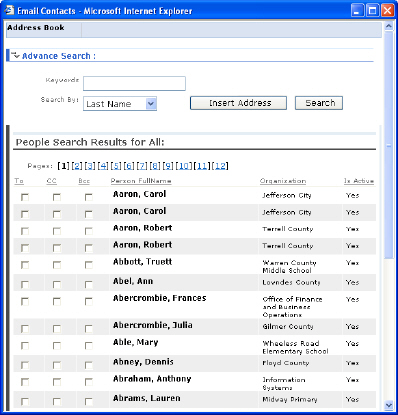
A sample Address Book page
Select the parameter by which to search from the Search By dropdown box, as shown below. Users can search by Department, Division, Organization Role, Application Role, School System, School, and user Last Name. The default is user Last Name.
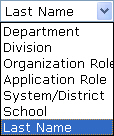
The Search By dropdown box
Click inside the Keywords field and enter the appropriate key word or key words. If searching by last name, enter the last name of the person for whom you are searching.
Click the Search button. MyGaDOE searches for the information requested and returns a list of all records containing the search parameters. For Example, if you search for the last name Smith, a long list of Smiths will be returned.
Note: The address book is not case sensitive, nor does it distinguish between text from the first part of a word versus the last part. For example, If you are looking for someone with the last name Gerald, and enter the search string "Ge", your search will return all people with the letter combination "ge", so, in addition to the Mr. Gerald you are looking for, your list will also include all the "Rogers" in the address book.
Locate the appropriate result from the list of results returned. If the number of people in the list is too many to show on one page, MyGaDOE breaks them into multiple pages and provides a numbered link to each page (1 through whatever the highest numbered page) near the top of each page.
Check the appropriate check box to the left of the name. To = the message recipient, CC = Carbon Copy, and Bcc = Blind Carbon Copy.
Click the Insert Address button. The address button is added to the specified address field in the message.
This completes the Use Address Book task.