
|
MyGaDOE |
Version 1.0 |
The Portlet Options menu is accessed from the "options" option, located near the top right of a portlet's box, as shown below.
A sample portlet dialog box, showing the "options" option near the top right of the box
When clicked, the Portlet Options menu displays, as shown below.
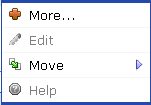
The Portlet Options menu
The Portlet Options menu allows users to perform four basic functions related to the portlet, as follows:
More... -- Starts the specified portlet and takes the user to its main page.
Edit -- Allows the user to edit information in the specified portlet (not available for all portlets, depending upon the user's security rights).
Move -- Allows users to move the specified portlet relative to other portlets and items on the page (see the image, below).
Help -- Links the user to online help relative to the portlet (not yet implemented in most cases).
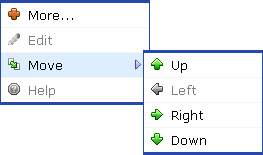
The Portlet Options menu, expanded to show Move options