
|
MyGaDOE |
Version 1.0 |
When a user requests access to MyGaDOE, either by establishing a new account or by requesting permissions to be added to an existing account, the request is sent to the appropriate security officer for approval (Click here to read more about the security officer role). Only security officers can approve or reject a user request for access. In addition, if the request includes access to an application where the business owner has requested approval rights, then the request must also be approved by that business owner (Click here to read more about the business owner role).
A link within the message takes the security officer or business owner to the appropriate approval page.
If you are a security officer or business owner, complete the following steps to approve or reject such a request:
The process begins when the Security Officer receives an automated message from the MyGaDOE messaging system, forwarding a user’s request for MyGaDOE Access. The message appears in the MyGaDOE header, as shown below.
A sample MyGaDOE header showing the blue Utility menu, with 1 message waiting to be read
A sample of this type of message is shown below.
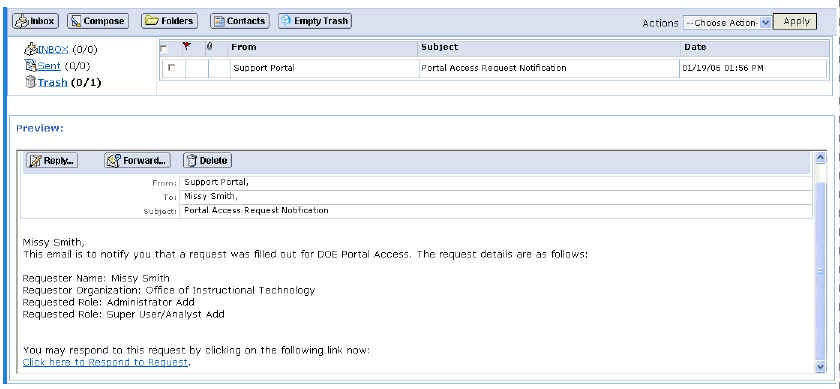
A sample automated message showing a request for access to MyGaDOE
Click the "Click here to Respond to Request" link at the bottom of the message. The MyGaDOE User Access Request Approval page displays, as shown below.

The MyGaDOE User Access Request Approval screen (note the color coded flags and the key at the top of the page)
Click the Plus (+) symbol next to the name of the user you want to approve or deny. The user’s request information displays, as shown below. This allows you to review the details of the user’s request.
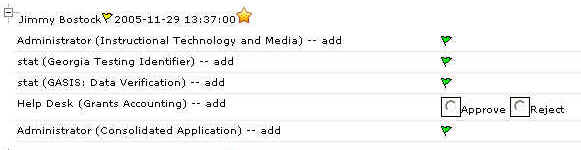
The user’s request information section of the MyGaDOE User Request Approval page
Click the Approve radio button to approve the request or the Reject radio button to deny the request.
Click the Submit button. The selection is processed and the user is automatically e-mailed regarding the approval or rejection.
Note: If the request is for access to an application where a business owner has requested approval rights, then that business owner must also approve (or reject) the request. Once this occurs, the user is then e-mailed automatically with the approval or rejection.