 ) on the list of news items that displays as part of the
View News function. Otherwise,
you will neither be able to see the icon nor edit a news item.
) on the list of news items that displays as part of the
View News function. Otherwise,
you will neither be able to see the icon nor edit a news item.|
MyGaDOE |
Version 1.0 |
Access for editing existing news items is limited
based on job function. If
you have access rights to edit news items, you will see the edit icon
() on the list of news items that displays as part of the
View News function. Otherwise,
you will neither be able to see the icon nor edit a news item.
To edit a news item (if you have edit access rights), please complete the following steps:
From the
View News Page (see View
News
for information about accessing this page), click the Edit () icon for the item you wish to edit. The
Edit News page displays, as shown below.
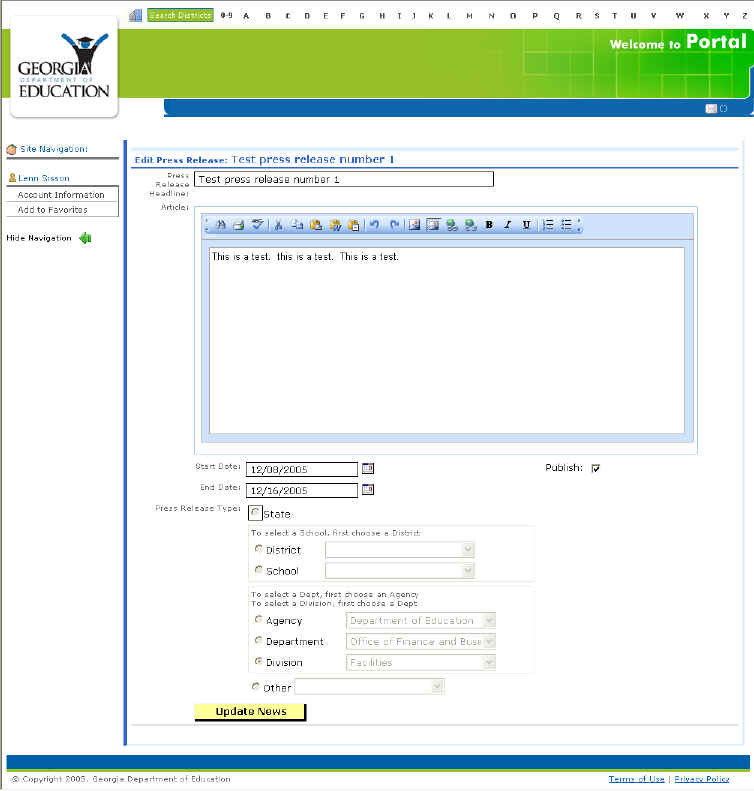
An example of the Edit News page
Make appropriate changes to the fields.
Click the Update News button. The news item is updated and the user is returned to the View News page.
This completes the edit news item process.